Deliverability is usually treated as a one-time project. You buy a few domains, set up SPF, DKIM, and DMARC, run a warmup sequence for a few weeks, and then you start sending. Once the emails are going out, most teams stop looking. The infrastructure feels done.
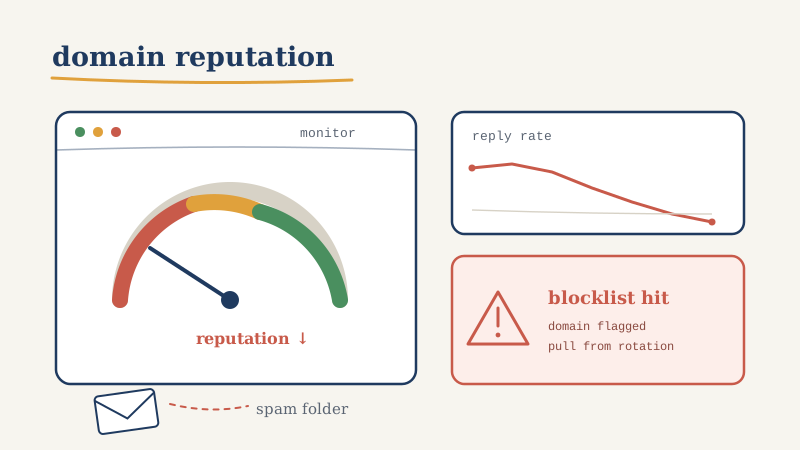
It is not done. Sending domain reputation is not a state you reach and hold. It is a moving number that responds to how recipients react to your mail, how clean your list is, whether spam traps sit in your data, and whether a blocklist has flagged the IP or domain you send from. That number drifts down far more easily than it climbs back up. And the worst part is how quietly it happens. There is no error message when your reputation slips from good to mediocre. Your emails still send. They just stop landing in the inbox.
By the time a human notices, the symptom is almost always the same: reply rates fell off a cliff and nobody changed the copy. That is the signature of a deliverability problem, and by the time it shows up in your reply numbers you have usually lost two to four weeks of pipeline. This post is about closing that gap. Not the setup work you already know, but the ongoing monitoring layer that tells you a domain is in trouble while you can still do something about it.
Why reputation decays even when you did the setup right
A domain that passed every authentication check on day one can still degrade for reasons that have nothing to do with your DNS records. Reputation is fundamentally a behavioral score. Mailbox providers watch how recipients interact with your mail and adjust placement accordingly. A few things push that score down over time:
List decay. B2B data goes stale fast. People change jobs, companies fold, and email addresses get abandoned or converted into spam traps. Sending to dead addresses raises your bounce rate, and a rising bounce rate is one of the fastest ways to signal to a provider that you are not managing your list. This is why front-loading verification matters, and why re-verification on a schedule matters even more. A list you validated three months ago is not the list you have today.
Spam trap hits. Some of the addresses sitting in an aged list are pristine traps or recycled traps, addresses that exist only to catch senders who do not clean their data. Hitting one can do outsized damage relative to the single send it represents.
Recipient signals. Marking as spam, deleting without opening, and never replying all feed into placement decisions. If your targeting drifts or your copy gets more aggressive, engagement drops and placement follows.
Blocklist events. Public and private blocklists (often called blacklists) can flag your domain or sending IP based on trap hits, complaint spikes, or shared-IP neighbors behaving badly. A single blocklist entry can tank placement across multiple providers at once, and you will not get a notification when it happens.
None of these show up as an error. They show up as a slow, silent decline in how many of your emails a human ever sees. That is exactly the kind of failure that continuous monitoring exists to catch.
The four signals worth watching
You do not need a dozen dashboards. You need four categories of signal, checked on a cadence, with a threshold that triggers action.
1. Placement, not delivery
Delivery rate lies to you. An email that lands in the spam folder still counts as delivered. What you actually care about is inbox placement: of the mail that reached the recipient’s server, how much reached the primary inbox versus spam or a promotions tab. You measure this with seed lists, a set of monitored addresses across the major providers that you include in sends so you can see where your mail actually lands. When primary-inbox placement starts sliding on a specific provider, that is your earliest warning, often days before reply rates move.
2. Bounce rate and list health
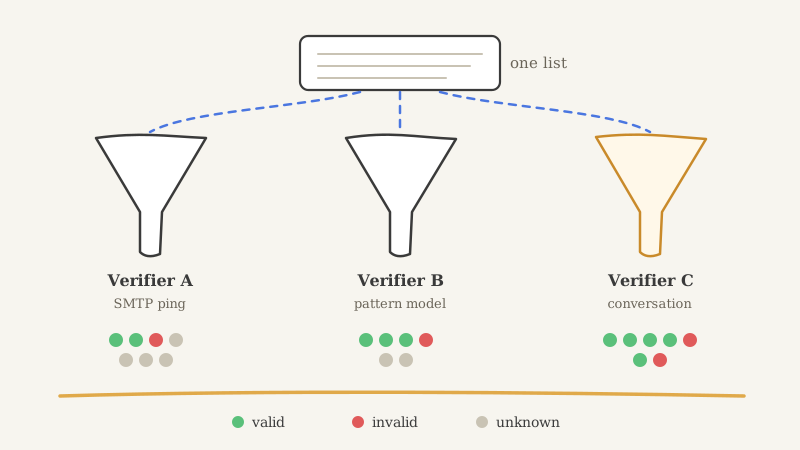
Watch bounce rate as a trend, not a single number. A stable 1 to 2 percent is normal noise. A steady climb week over week means your list is decaying faster than you are cleaning it, and the fix is upstream: verify before you send, and re-verify on a schedule. Running your list through a validation layer like Scrubby before each campaign, especially on catch-all and risky domains that most validators skip, keeps the traps and dead addresses out before they ever touch your reputation. Verification is not a one-time gate at import; it is a recurring hygiene step.
3. Blocklist and domain status
Check whether your sending domain or IP appears on any major blocklist, and check it on a schedule rather than reactively. This is where most teams have their biggest blind spot. A domain can get listed on a Tuesday, quietly cut your placement in half, and go unnoticed until the following Monday when someone finally asks why the numbers look off. Continuous monitoring closes that window. The same discipline that a tool like CAM applies to watching competitor and website changes applies here: you want an automated watcher checking domain and blocklist status on an interval and alerting you the moment something changes, not a human remembering to check a lookup site once in a while.
4. Authentication drift
SPF, DKIM, and DMARC can break after setup. A DNS change during an unrelated migration, an expired key, or a new sending tool added without updating your SPF record can quietly invalidate authentication. DMARC aggregate reports tell you when mail is failing alignment. Read them, or route them into a tool that summarizes them, so you catch a broken record before providers start treating your mail as suspicious.
Set thresholds, then automate the alert
Monitoring without a threshold is just a dashboard nobody looks at. For each signal, decide in advance what number triggers action:
- Primary inbox placement drops below 80 percent on any major provider. Pause new volume on that domain and investigate.
- Bounce rate climbs above 3 percent, or rises for two consecutive weeks. Stop and re-verify the list before the next send.
- Any blocklist entry appears. Treat as urgent. Pull the domain from active rotation immediately.
- DMARC alignment failures appear where there were none. Audit your DNS and sending tools before the next campaign.
The point of writing these down is that they turn a vague sense of “things feel off” into a specific, automatic response. The teams that recover fastest are not the ones with the best copy. They are the ones who caught the drop on day two instead of day twenty.
Automation matters here because reputation problems compound. Every day you keep sending from a degraded domain, you are adding more low-engagement sends and more potential complaints, which drives the score down further. Manual checking guarantees you will be late, because a human only looks when something already feels wrong. An automated watcher checks on an interval and pings you the moment a threshold breaks, which is the difference between losing a day and losing a quarter.
What to do when a domain is already in trouble
Detection is only half the job. When monitoring flags a problem, you need a recovery playbook so you are not improvising under pressure.
Pull the domain out of rotation. Stop sending net-new cold volume from the affected domain immediately. Continuing to send from a degraded domain digs the hole deeper. This is exactly why a mature outbound setup runs multiple sending domains and inboxes: you can pull one without stopping the entire program.
Diagnose the cause before you fix. Was it a bounce spike (list problem), a complaint spike (targeting or copy problem), a blocklist entry (trap or neighbor problem), or an authentication break (DNS problem)? The recovery path is different for each, and treating a targeting problem like a DNS problem wastes the days you cannot afford to waste.
Clean the input. If the root cause was list quality, re-verify the entire list and suppress everything risky before the domain ever sends again. Sending clean, engaged mail is the only thing that rebuilds a score.
Re-warm patiently. A domain that landed on a blocklist and got delisted does not snap back to full reputation. Drop volume to a fraction of normal, send to your most engaged, most likely-to-reply segment first, and rebuild placement gradually. Rushing the re-warm just re-triggers the problem.
Delist where you can. Many blocklists have a removal request process. Submit it, but understand that delisting is not the same as recovered reputation. The score still has to climb back through good sending behavior.
Recovery takes weeks, which is precisely why early detection is worth so much. Catching a problem before it becomes a blocklist entry might cost you a day of paused volume. Catching it after can cost you a month of rebuild.
Why this belongs in your infrastructure, not your to-do list
The reason most teams do not monitor reputation continuously is not that they disagree it matters. It is that it is genuinely tedious. Seed testing across providers, reading DMARC reports, checking blocklists on a cadence, watching bounce trends, and maintaining the thresholds and alerting to tie it all together is real operational work that competes with everything else a small team is trying to do. So it slips, and the monitoring layer that would have saved a quarter never gets built.
This is one of the clearest arguments for treating outbound as infrastructure rather than a project you set up once. When deliverability monitoring is owned by a team that runs it as a system across a portfolio of domains, the drift gets caught early as a matter of routine, not as a lucky catch. That is a large part of what you are buying when you run outbound through an outsourced GTM partner like Vendisys instead of standing up and babysitting the infrastructure yourself: the boring, continuous vigilance that keeps domains healthy and keeps your reply rate from quietly bleeding out.
If you are running the program in-house, the takeaway is the same even if the ownership is different. Set your four signals, write down your thresholds, automate the alerting so a machine watches when you are not, and keep your list clean going in. Reputation is not a state you achieve. It is a number you defend, every week, whether you are watching or not. The only real choice is whether you find out about the drop on day two or day twenty.